November 24, 2025

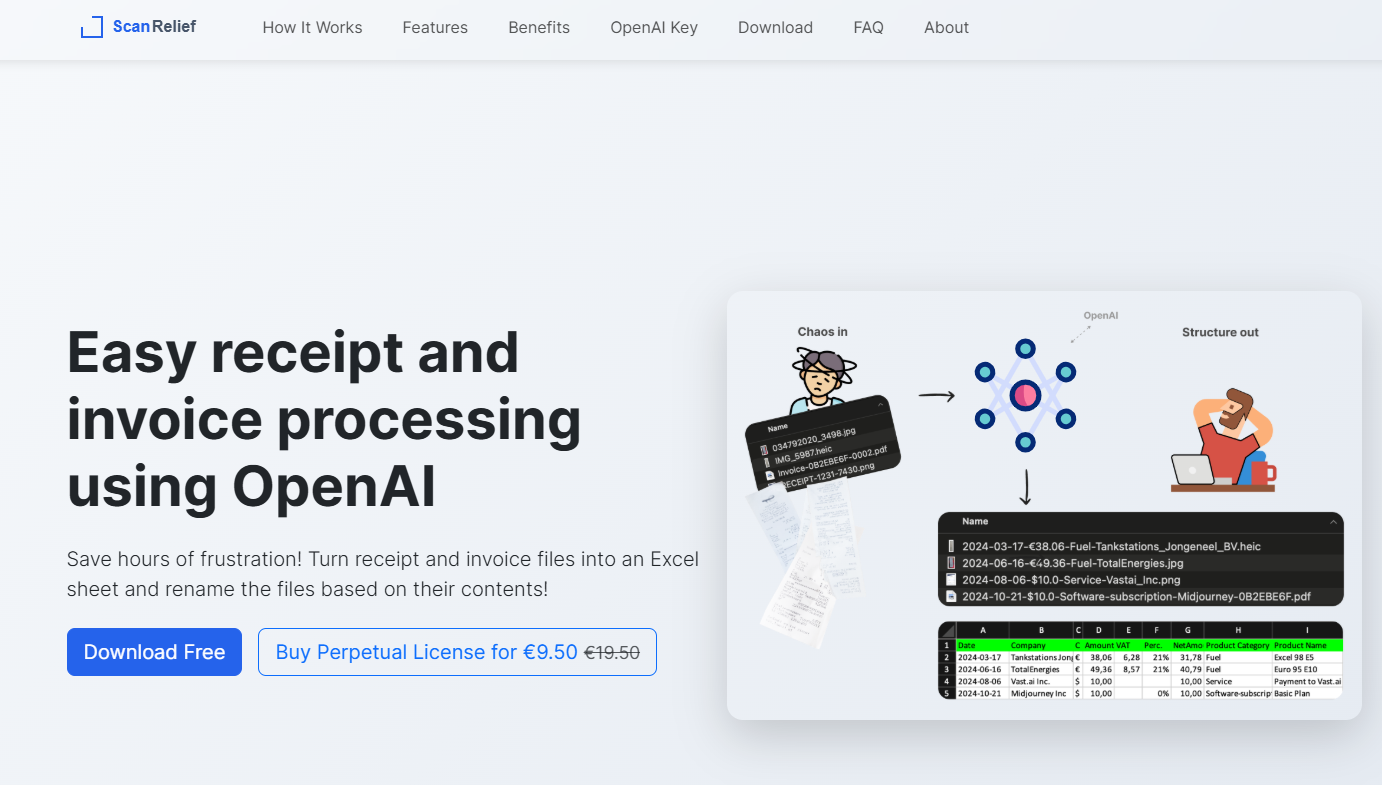

ScanRelief AI offers a smart solution for your receipt management needs. This innovative app uses powerful automation to make organizing your finances simpler than ever before. Here’s how it helps:While ScanRelief AI streamlines many aspects of receipt management, users should be aware that there may be some limitations, such as occasional inaccuracies in scanning certain types of receipts or limited integration with some accounting platforms. Additionally, advanced features might require a subscription.
Are you tired of drowning in a sea of paper and digital receipts? For any small business owner or freelancer, effective receipt management is crucial but often a frustrating task. ScanRelief is an AI-powered tool designed to end that struggle. This software takes the chaos out of tracking expenses by automatically converting your receipt files into neatly organized Excel spreadsheets. It’s like having a personal assistant dedicated to simplifying your financial records and saving you valuable time.
Say goodbye to receipt chaos and hours of manual sorting. ScanRelief streamlines the entire process by using AI to analyze your receipts, extract important information, and organize it for you. This means you can easily match receipts with your accounting records and bank transactions without the usual headache.
You can try the app with a free trial to see how it works for you. All you need to get started is a paid OpenAI API subscription, ensuring you only pay for what you use. This approach transforms a dreaded chore into a simple, automated task. Now, let’s explore how the app achieves this.
Piles of unsorted digital files on your computer can create significant clutter and make finding a specific invoice or receipt nearly impossible. Do you waste time opening file after file, trying to find the one you need? ScanRelief brings order to this mess by creating a logical and intuitive storage system right on your hard drive.
The app intelligently renames your digital files using the information it extracts. Instead of generic names like "IMG_1234.jpeg," your files will be clearly labeled. The new names include key details that make them instantly recognizable and sortable, such as:
This organized approach completely revamps your workflow. You no longer have to dig through your email or random folders. With files named descriptively and sorted chronologically, you can find any receipt or invoice in seconds. This makes preparing for tax season or matching expenses to your Excel sheet a smooth and stress-free process.
One of the biggest time-savers ScanRelief offers is its automated data extraction. Forget about manually typing numbers from a receipt into a spreadsheet. The app uses advanced OCR (Optical Character Recognition) technology through the OpenAI API to read and understand the contents of your receipt images and PDFs.
To enable this feature, you simply need your personal OpenAI API key. Once you provide the key, the automation kicks in. The app analyzes each file, identifies crucial information like the vendor, date, and total amount, and pulls it out for you. This process is fast, efficient, and significantly reduces the chance of human error that comes with manual entry.
For professionals, this level of automation is a game-changer. It creates detailed documentation of your expenses without the tedious labor, freeing you up to focus on more important aspects of your business. The extracted data is compiled into a comprehensive Excel file, creating perfect accounting records with minimal effort on your part.
ScanRelief is packed with features designed to make document handling and receipt management as efficient as possible. The app’s core strength lies in its intelligent automation, which renames files and generates detailed reports, creating clear documentation for all your expenses. You can process multiple files at once, saving you a significant amount of time.
This streamlined workflow is supported by a simple, user-friendly interface that works on both Mac and Windows. The combination of these features ensures that you have a powerful tool for organizing your financial documents right at your fingertips. Below, we’ll look closer at some of these standout capabilities.
How can you easily convert your receipts into an Excel sheet? ScanRelief makes this incredibly simple. The app is designed to take various receipt files, including PDF, PNG, and JPEG formats, and turn them into a structured Excel report. This function is at the heart of what makes the tool so powerful for expense tracking.
The software doesn't just list file names; it populates the Excel sheet with key data extracted directly from each receipt. This provides a clear, detailed overview of your spending in one convenient place. The table below shows what kind of information you can expect in your report.
Information Extracted
Benefit for You
Date of Purchase
Helps you sort expenses chronologically.
Vendor Name
Makes it easy to search for specific transactions.
Total Amount
Allows for quick tracking and budget analysis.
Key Details
Provides a comprehensive and consolidated report.
Better yet, ScanRelief supports batch processing. This means you can upload an entire folder of receipts at once, and the app will handle the conversion on your Mac or PC. It will generate a single, organized Excel sheet, saving you from the repetitive task of processing one file at a time.
While ScanRelief is a powerful standalone app, its true value shines when you see how it fits into your broader financial workflow. It is designed to produce outputs that are easily integrated with the productivity tools you already use, creating a seamless process from receipt collection to final accounting.
The primary method of integration is through the organized Excel sheet it generates. This file isn't locked into a proprietary system; it's a standard spreadsheet that can be imported into most accounting software, used in custom financial models, or shared with your accountant. This flexibility gives you full control over your data.
This approach enhances your workflow in several ways:
In conclusion, ScanRelief AI revolutionizes receipt management by offering efficient storage solutions and automating data handling. With features like organized digital storage and seamless integration with productivity tools, it not only simplifies the process but also saves you time and effort. By leveraging this innovative tool, you can say goodbye to the hassles of manual data entry and keep your financial documents in check effortlessly. If you’re ready to streamline your receipt management process, don’t hesitate to start your journey with ScanRelief AI today!
Yes, absolutely. ScanRelief is designed to process both receipt and invoice files. The app’s automation can extract key information from either type of document, rename the file accordingly, and add the data to your Excel report. This makes it a versatile tool for managing all your financial paperwork in one streamlined workflow.
Getting started with ScanRelief is straightforward. First, download the app for your Mac or Windows computer. Next, you will need to obtain a paid OpenAI API key and add some credits to it. Once you have your API key, simply enter it into the app, and you're ready to start your new, efficient workflow!
Yes, significantly. ScanRelief uses automation and OCR technology via your OpenAI API key to read each receipt and automatically extract important data. This information is then compiled into your accounting records in an Excel file, eliminating the need for you to type everything out by hand and reducing potential errors.