December 26, 2025

Here's a quick look at what makes Vidsembly a game-changing AI video toolkit for your creative projects:
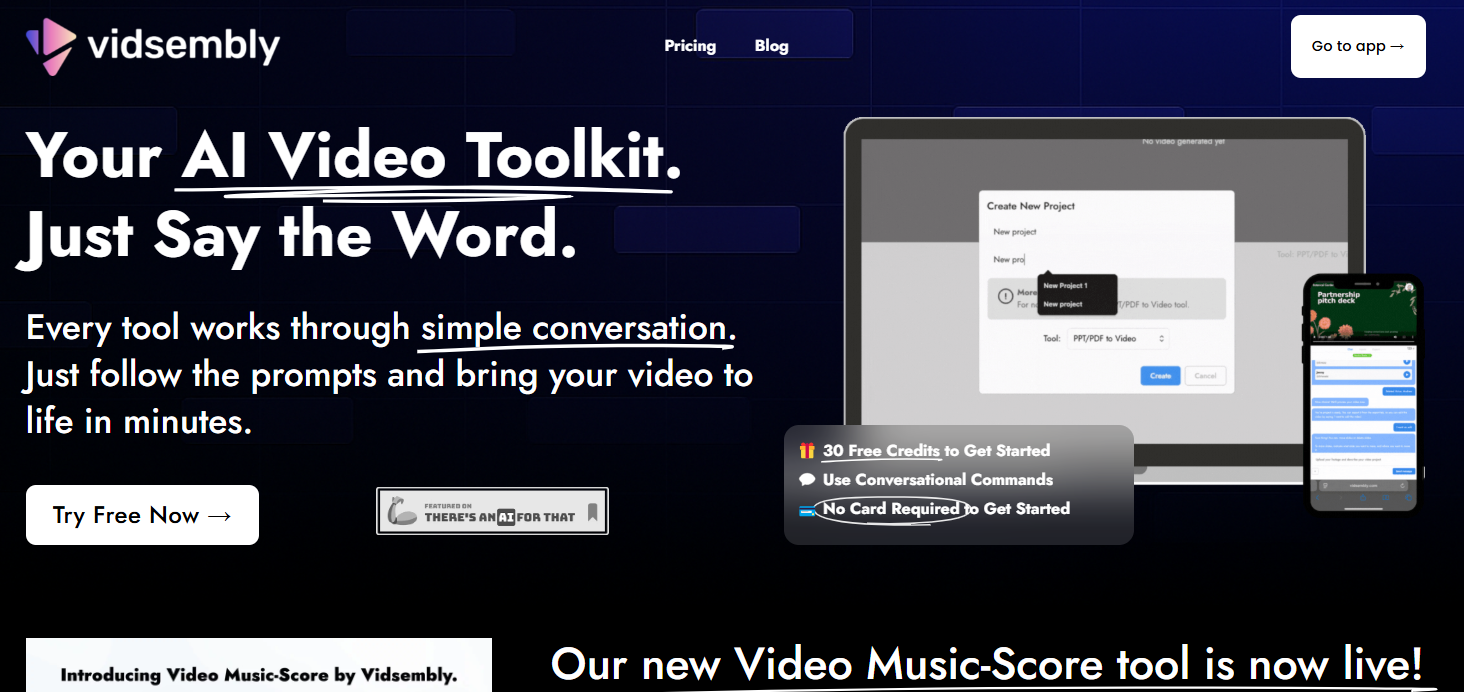
Are you looking for a simple way to turn your presentations into engaging videos? Meet Vidsembly, the conversational AI video toolkit designed to make video creation easy and fast. This innovative platform allows you to transform your PDF presentations and PowerPoint slides into fully narrated videos using just simple text commands. Whether you're in sales, HR, or education, Vidsembly has a wide range of use cases to help you communicate your message more effectively without needing any editing experience.
Vidsembly operates as your personal AI video toolkit, simplifying content creation through a unique conversational approach. You don't need complex software or editing skills. The process is straightforward: create a project, upload your file (like a PDF or PPT), and then follow the prompts. The AI interprets your conversational commands to handle the editing, narration, and final touches, turning your static document into a professional video. If you're interested in a detailed review or comparison of Vidsembly with other AI video tools, you can often find comprehensive analyses on trusted tech blogs, AI software review sites, or platforms like G2 and Capterra. These resources provide side-by-side feature comparisons and user experiences to help you choose the right video toolkit for your needs.
This video tool is built for efficiency and accessibility. Once the AI has worked its magic, you can preview the result, ask for small tweaks, and then export the finished video. It’s a powerful way to repurpose existing materials into engaging content without the traditional time and cost. The platform is designed to streamline your workflow, making video creation a matter of simple conversation rather than technical labor. Explore how this intuitive system makes video production accessible to everyone.
The magic of Vidsembly lies in its conversational workflow. Instead of navigating complicated menus and timelines, you interact with the tool as if you're having a conversation. The interface prompts you for instructions, and you guide the video creation process with simple text commands.
This unique functionality removes the steep learning curve associated with traditional video editing software. Do you want to remove a slide or change the narration speed? Just say the word. This direct interaction makes the entire process feel intuitive and natural.
Professionals can significantly speed up their workflows by using this method. You can make quick tweaks and adjustments on the fly without getting bogged down in technical details. This conversational approach puts you in the director's chair, focusing on the message while the AI handles the execution.
Vidsembly specializes in bringing your static documents to life. The platform directly supports two of the most common presentation formats: PowerPoint (PPT) and PDF. You can upload your existing slide decks or documents and watch as they are converted into dynamic, narrated videos.
This capability is perfect for a variety of professional needs. Imagine turning a dense training manual into a video that employees will actually watch or transforming a sales presentation into a compelling follow-up for a potential client.
The possibilities are extensive. Here are just a few examples of how you can use this feature:
Vidsembly is more than just a conversion tool; it's a complete toolkit designed to enhance video projects for individuals and teams. Even if you have editing experience, the platform offers features that streamline your process. From AI-powered audio integration to tools that support team workflows, it helps you produce high-quality content faster.
For teams, especially in departments like sales or marketing, the platform provides a consistent and efficient way to create content. The following sections will explore some of the standout features, including the innovative AI-powered music tool and the enhancements that make collaboration a breeze.
Yes, you can absolutely add AI-powered music to your videos with Vidsembly! The Video Music-Score tool is a fantastic feature for adding a professional audio track to your content. This tool generates a custom, copyright-cleared, and royalty-free music track that is automatically fitted to your MP4 video. You don’t have to worry about licensing issues or searching for the perfect song.
The customization options give you full creative control over the final audio. You can choose a music style that matches the tone of your explainer video or presentation, preview the result, and even make adjustments to the volume or add fades for a smoother finish.
This powerful audio editing functionality ensures your video has the right atmosphere. The table below summarizes what you can do with the AI music tool.
Feature
Description
Custom Music Generation
Creates a unique, royalty-free track based on your chosen style.
Automatic Fitting
The generated music is automatically sized to fit the length of your video.
Volume & Fade Controls
Easily adjust the music volume or add fade-in/fade-out effects.
Simple Export
Export your video with the new, perfectly synced music track included.
Vidsembly is built to improve how teams create and share video content. While it simplifies video creation for individuals, its true power shines in a collaborative environment by standardizing workflows. Teams can produce consistent, high-quality videos without needing every member to be a video expert.
The intuitive interface allows different departments to easily adopt video. For instance, an HR team can turn a compliance document into a video, or a sales team can quickly create personalized video follow-ups for client presentations. This enhances internal communications and external outreach.
Vidsembly helps teams improve engagement and message retention with video. Key benefits for collaborative workflows include:
KeywordSearch has an AI Audience builder that helps you create the best ad audiences for YouTube & Google ads in seconds. In a just a few clicks, our AI algorithm analyzes your business, audience data, uncovers hidden patterns, and identifies the most relevant and high-performing audiences for your Google & YouTube Ad campaigns.
You can also use KeywordSearch to Discover the Best Keywords to rank your YouTube Videos, Websites with SEO & Even Discover Keywords for Google & YouTube Ads.
If you’re looking to SuperCharge Your Ad Audiences with AI - Sign up for KeywordSearch.com for a 5 Day Free Trial Today!
In summary, Vidsembly offers an innovative AI video toolkit that unlocks creativity and streamlines the video creation process. With key features such as conversational workflows, powerful music integration, and collaborative tools, it stands out as an essential resource for both individual creators and teams. By transforming traditional presentations into engaging videos, Vidsembly not only enhances the content creation experience but also boosts productivity. Embracing this technology can lead to more dynamic and impactful videos, making it a valuable addition to your creative arsenal. If you're ready to elevate your video projects, consider exploring what Vidsembly can do for you!
Yes, absolutely. Vidsembly is designed to work with your existing presentations. You can upload your PPT or PDF slide decks, and the video tool will use them as a template to generate a custom-narrated video. It’s a perfect way to repurpose content you’ve already created.
Definitely. Vidsembly is ideal for creating educational and professional content. Teachers can turn lessons into shareable videos for students, while businesses can create an explainer, training videos, or content for webinars. It allows you to transform important information into a format that is easy to watch and share.
Vidsembly distinguishes itself from other AI video platforms with its unique conversational editing functionality. While many tools offer AI features, Vidsembly’s focus on a simple, prompt-based workflow makes it exceptionally accessible for users without any technical editing experience, setting it apart in the market.